


My Row Counter: Knit & Crochet
4.82.17K Reviews
App Specs
- Version
- Varies with Device
- Updated On
- License
- Free
- Downloads
- 1,000,000+
- Developer
- Annapurnapp Technologies GmbH
- Categories
- Lifestyle
- Platform
- Android
Screenshots
 Analysis by AppCompare
If you knit or crochet, you know how easy it is to lose your place when a project gets interrupted. I find a row counter most useful when it takes less effort to check than a scrap of paper or a tally in my head. My Row Counter: Knit & Crochet is built around that practical need, with project tools that can help keep pattern work, timing, and notes together.
Where the app fits in a crafting routine
This is a free lifestyle app from Annapurnapp Technologies GmbH, with optional in-app purchases ranging from $0.99 to $14.99 per item. It is rated for Everyone, and its 4.8 average from around 15,000 ratings suggests that many crafters find the basic idea useful. I would think of it less as a replacement for a pattern or a crafting community and more as a workbench companion: a place to keep track of progress while the yarn and instructions remain the center of attention.
The key question is whether you want a digital home for several works in progress, rather than a counter alone. If all you need is a number that increases when you tap the screen, a minimal counter app or a physical clicker may be quicker. If you often switch between projects, need to preserve context, or want a timer alongside the count, this app has a stronger case.
Getting Started with My Row Counter
First things first, downloading and setting up My Row Counter: Knit & Crochet is a breeze. Available for both Android and iOS, you can grab it from the app store and have it ready in no time. No complicated sign-ups; just download, and you’re good to go.
Once inside, you're greeted with a clean and straightforward interface. It’s designed with crafters in mind, so you won't be fumbling around trying to figure out what button does what. The app’s main screen allows you to start a new project or continue with existing ones. Handy, right?
The Features You’ll Love
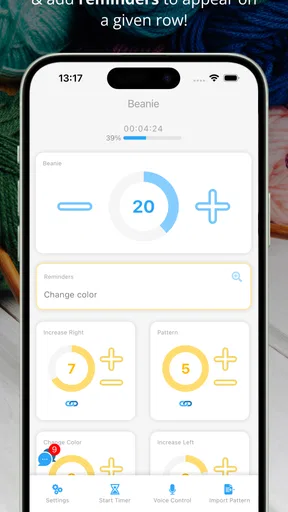
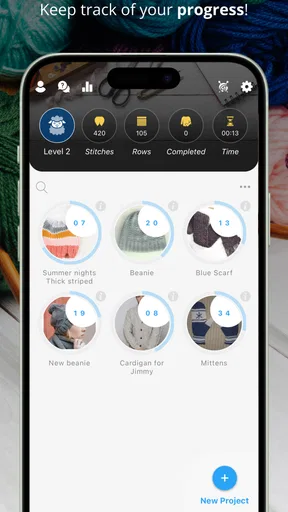
The app shines with its row counting capabilities. You can easily add new projects, and each project has its own counter. Say goodbye to scribbling numbers on scraps of paper or losing track mid-project.
But it doesn’t stop there. You can customize each project with specific details like the type of yarn, needle size, and even add notes. This is super helpful if you’re juggling multiple projects at once. I personally love the ability to set reminders for each project. It’s like having a little nudge to keep you on track.
Worth Reading Before You Choose

EA SPORTS FC Mobile 26 Is a Bigger Football Game, but It Takes Time

Flipboard Shows What News Apps Must Do Beyond the Feed

Switching to Android Auto Means Rethinking Your Driving Routine

Google Calendar Makes a Crowded Week Easier to Manage

Ludo King Makes the Most of the Minutes Between Plans

Baby Panda World Brings Quick Play to Modern Phones, but Its Game Library Feels Busy
Another standout feature is the timer. If you’re timing your crafting sessions, this is gold. You can see how long you’ve been working on a piece and even set goals or challenges for yourself.
What Makes It Stand Out?
Now, I’ve tried a fair share of row counting apps, but this one really nails the user experience. The app doesn’t bombard you with ads, which is a big plus in my book. Nothing worse than a pop-up ad when you're deep in concentration counting stitches.
The app also allows for easy project management. You can archive finished projects, so they don’t clutter your main screen, but they’re still there if you ever need to reference them again. It’s all about keeping things tidy.
And for those of us who are a bit forgetful, the backup and restore feature is a lifesaver. You can sync your data, so if you switch devices or something goes awry, your projects are safe and sound.
Making project tracking more dependable
A useful habit is to treat the counter as a checkpoint, not as a substitute for reading the pattern. Before putting a project down, I’d confirm the displayed row against the instruction and leave a short note about the next action, such as whether the next row is a repeat or a shaping row. That extra context matters because a correct row number alone may not tell you where you are in a repeating sequence.
For a project with several pieces, separate counters can also help prevent a common mix-up: continuing the front panel’s count while working on a sleeve. Give each project a distinctive name and use its notes for details that are easy to forget, like which size you are following or where you changed a repeat. The trade-off is that this requires a little setup. If you prefer to cast on and start counting immediately, a simple tally counter has less overhead.
The timer is most useful as a rough record of sessions rather than a promise of precise productivity. I’d use it to notice whether a task usually takes one sitting or several, then plan a realistic stopping point. It can also be handy when comparing your own pace on similar pieces, but I wouldn’t let a goal turn a relaxing hobby into a race. The app supports the work; it shouldn’t dictate how quickly you enjoy it.
Pattern tools and the value of a larger workspace
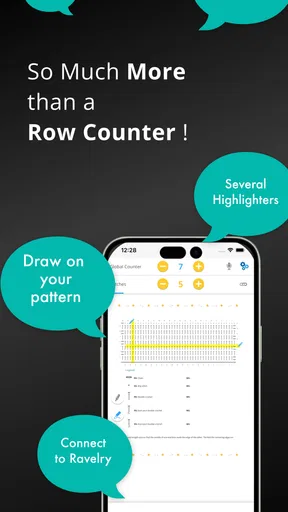
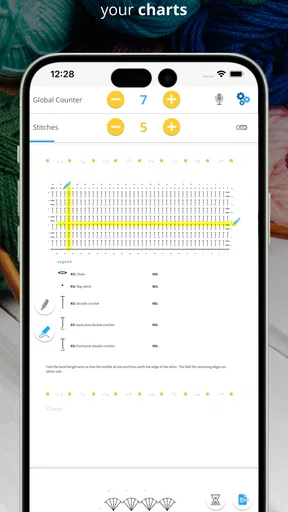
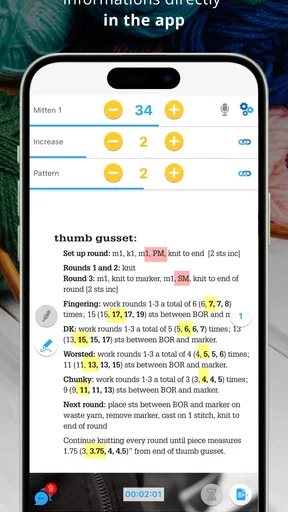
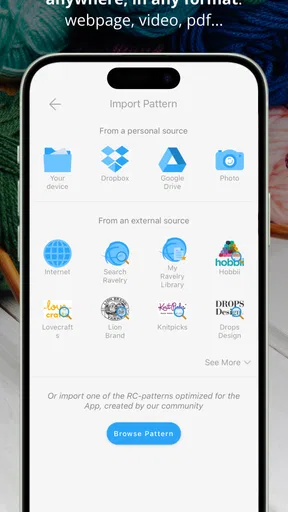
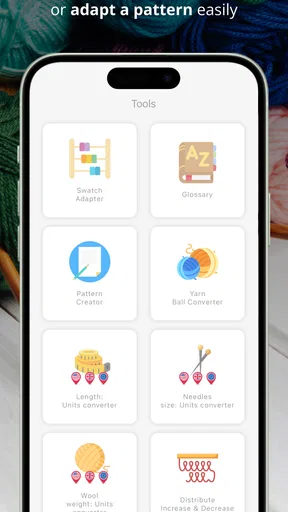
Pattern import and a highlighter are especially appealing for instructions with repeated sections: they can make it easier to keep the relevant line in view while your hands are busy. I’d still keep the original pattern accessible, especially for charts or instructions that need careful visual comparison. A phone screen may feel cramped when a pattern uses small symbols, and highlighting should be treated as a reading aid rather than proof that the count is correct.
One practical workflow is to bring in the pattern, mark the current line, and use the project counter for row progress. Keep personal corrections or reminders in the project notes rather than relying on memory. This creates a useful separation: the pattern tells you what to make, the highlighter helps you find your place, and the counter records progress. If you mostly work from a printed chart spread across a table, though, a paper marker may remain easier to see at a glance.
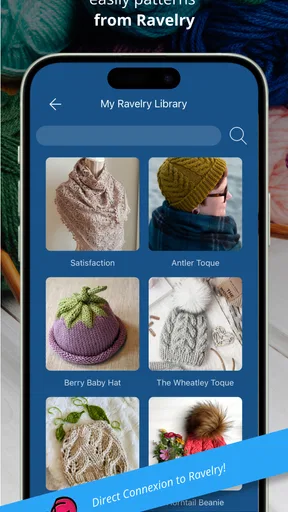
The Ravelry connection may matter to crafters who already use that service to find or organize patterns. It gives the app a different role from a bare counter, but it is not a reason on its own to move every project into a new system. If your existing pattern library and notes already work well elsewhere, try one active project first and see whether the combined workflow saves effort before changing your habits.
A realistic session, from interruption to restart
Imagine you are crocheting after dinner and need to pause when someone calls. Rather than relying on the number you remember, you can stop the session, check the project’s counter, and leave a note about the stitch repeat or the next instruction. When you return the following evening, you have both the row count and a small piece of context to get moving again. That is where project-level tools can be more valuable than a counter that only remembers a number.
There is still a human step: you need to tap accurately and choose the right project. A distracted tap, an accidental extra press, or forgetting to switch counters can put the record out of sync. If that happens, compare the work in your hands with the pattern before editing the count; correcting from the fabric is safer than guessing from the last session. For intricate lace or frequent decreases, I would double-check at each pattern checkpoint instead of trusting a single running total.
Who will appreciate it, and who may not
I’d recommend giving it a try if you keep several knitting or crochet projects going, regularly pause mid-row, or want notes and a timer close to your counter. It can also suit someone who is learning to follow longer patterns and wants a clearer record of where each project stands. The app’s broad age rating makes it accessible to a wide audience, though younger users may still need help organizing pattern details and project notes.
It may be more than you need if you make simple items with short, easily remembered row sequences, or if you dislike using a phone while crafting. A physical counter is immediate, works without navigating between project screens, and is easy to use when your phone is charging elsewhere. Likewise, a notebook can be better for sketching, swatches, and free-form design notes. The app’s advantage is convenience across multiple projects; its cost is the attention and upkeep involved in maintaining a digital record.
For anyone wondering whether it replaces a pattern-reading tool, I would say no: it helps organize progress, but you still need to understand the pattern and verify your work. If you want a shared crafting platform or detailed design software, a dedicated service may suit that purpose better. If the main problem is simply forgetting the row, this is a more focused option than a broad craft community app.
Keeping projects tidy without losing useful details
Archiving completed work is more than housekeeping. I like the idea of moving finished projects out of the active view while retaining them for reference, especially when I want to recall yarn or needle details for a later make. Before archiving, it is worth adding any final notes you may want to find again, such as a fit adjustment or a change you would make next time. An archive is only useful as a memory aid if the project has enough context to be recognizable later.
Backups and restore options can reduce the worry of changing devices, but I would still make a habit of checking that important project information has carried over before relying on a new phone as the only record. That is a sensible precaution for any app holding personal work notes. If you prefer to keep patterns and project records in a notebook, the app can still serve as a counter, but duplicating every detail in both places may become tedious.
Settings and reminders are worth exploring selectively. A reminder can help bring an unfinished project back to mind, but too many alerts can turn a pleasant hobby into another list of obligations. I’d start with only the settings that solve a real problem for you, then adjust after a few sessions. Similarly, theme options can make the screen more comfortable to use, but changing appearance is less important than making sure the active project and count are easy to identify.
What its track record says—and what to watch
My Row Counter has been available since January 31, 2018, and has grown to more than one million installs. That history gives the app a substantial user base, while its 2,100-plus written reviews offer a broader conversation than the rating alone. I wouldn’t treat popularity as proof that every workflow will suit me, but it is reassuring when choosing a tool intended to hold notes about ongoing projects.
The current picture is strongest for crafters who want several practical tools gathered around their work: counters, project details, timing, pattern-related aids, and ways to keep a finished project from crowding the active list. I would judge it by whether those pieces reduce interruptions in your own routine, not by how many options it offers. A feature you rarely touch does not make the app more useful than a simple counter you actually remember to use.
Because the app has optional purchases, I’d begin with the free version and decide whether the everyday workflow already fits before spending anything. The listed item prices range from $0.99 to $14.99, so check the purchase details in the app before buying and consider whether an extra feature solves a specific need. That is a better test than paying in the hope that more tools will automatically make project tracking easier.
When considering future changes, I’d watch for improvements that make switching between projects, checking a pattern, and recovering a count feel more dependable. Those are the moments where a small bit of friction can interrupt a crafting session. I would not assume a particular roadmap; what matters to me is whether the app continues to serve the practical needs of knitters and crocheters without making a simple row count feel complicated.
A Few Tips for New Users
If you’re just getting started with My Row Counter, take a moment to explore all the settings. You can tweak notifications, the interface, and even theme colors to suit your style. It’s these little touches that make the app feel personal and tailored to your needs.
Don’t overlook the community feedback section. It’s a great place to see what others are saying and find tips or hacks that might enhance your experience. Plus, the developers seem pretty active, taking suggestions and continually improving the app.
Final Thoughts
In summary, My Row Counter: Knit & Crochet is a fantastic tool for anyone serious about their knitting or crochet projects. It combines functionality with simplicity, making it a must-have in any crafter’s toolkit. Whether you’re a beginner or a seasoned pro, this app will help you stay organized and focused on what you love most: creating beautiful pieces.
So, if you haven’t already, give it a whirl. Happy knitting and crocheting!
Pros
- User-friendly interface for easy navigation.
- Customizable row counters for any project.
- Supports multiple projects simultaneously.
- Includes a timer for project tracking.
- Offers project notes and reminders.
Cons
- Limited free version features.
- No cloud sync for project backup.
- Ads may disrupt user experience.
- Lacks detailed pattern tutorials.
- Limited color themes for personalization.
FAQs for My Row Counter: Knit & Crochet
What platforms is My Row Counter: Knit & Crochet available on?
My Row Counter: Knit & Crochet is available for download on both Android and iOS devices. Users can easily find the app on the Google Play Store for Android or the Apple App Store for iOS. This ensures that knitters and crocheters can access the app regardless of their preferred device.
Does My Row Counter: Knit & Crochet support multiple projects?
Yes, My Row Counter: Knit & Crochet allows users to manage multiple projects simultaneously. This feature is particularly useful for those who like to work on different knitting or crochet projects at the same time, making it easy to switch between them without losing track of progress.
Are there any customization options available in the app?
The app offers a variety of customization options to suit individual preferences. Users can customize row counters, set reminders, and even track time spent on projects. These features help users tailor the app to their specific knitting or crocheting needs, enhancing overall productivity and enjoyment.
Is there a cost associated with downloading or using the app?
My Row Counter: Knit & Crochet is free to download, but it may offer in-app purchases. These purchases can include additional features or ad-free experiences. Users are encouraged to review any costs associated with these optional features before making a purchase to ensure it fits their budget.
How user-friendly is My Row Counter: Knit & Crochet for beginners?
The app is designed with a user-friendly interface, making it accessible for beginners. It includes tutorials and guides to help new users navigate its features. The straightforward design ensures that even those new to knitting or crocheting can easily track their progress and manage their projects efficiently.


